SmartSCM

Home / Product

One system, from the order to the money.

SmartSCM covers the whole shipment lifecycle across every mode. Use the parts you need — the modules work individually or together, on the same data.

Configurations

The same platform, shaped to how you operate.

These aren't separate products with separate data. They're configurations of one system — which is why a brokerage that also runs 3PL work doesn't need two TMSs.

BROKER

SmartBroker TMS

For a single broker or a brokerage with a complex agent network. Manage shipments across TL, LTL, intermodal, air and ocean; plan single or multi-mode routes; hold contracted buy and sell rates or enter spot rates; auto-rate and quote; turn quotes into orders without rekeying; settle with customers, carriers and agents.
3PL

Smart3PL TMS

Manage your customers' orders as if they were your own. Create routed orders through multiple modes — dray–rail–dray, truck–air–truck — consolidate several LTL orders into one multi-stop truckload, merge orders already in transit, and auto-rate for optimised carrier selection.

INTERMODAL

SmartIntermodal TMS

For asset owners: maximise utilisation through capacity planning and optimisation, manage rates and transit times, generate door-to-door quotes, and execute on a different route than the one quoted when reality demands it.

SHIPPER

Shipper operations

Run your own freight directly — quote, route, tender, track and audit — with the same rating and settlement engine your brokers use, so you can check their numbers against your own.

SmartTracker

Status from the driver's phone, not from a phone call.

Assign a load to a driver by entering their phone number. From then on, status arrives as the work happens — and the paperwork arrives with it.

Available for iPhone and Android. If your customer runs a different TMS, our APIs can feed tracking into theirs.

One thing worth knowing, because it is unusual: the mobile experience follows the same operating configuration as the web system rather than becoming a separate product that drifts away. Supported changes can reach drivers on refresh without waiting for a separate app release cycle.

  • Automatic status updates as drivers make pickups and deliveries
  • Geo-fencing improves status accuracy — defined once, then it just works
  • Documents and cargo photos uploaded from the app, attached to the shipment
  • Loads assigned to a driver by phone number, with no account setup ceremony
  • Tracking pushed into another TMS through our APIs
  • Changes reach drivers on the next refresh, with no app store submission and no forced update

Money

Settlement in the system that planned the load.

Financial settlement with customers and vendors happens against the shipment that actually moved, so the invoice and the movement can't drift apart.

Customer invoicing

Billed from the executed shipment, including accessorials captured during execution.

Carrier & vendor settlement

Pay carriers and vendors, including agent commissions under the agency model.

Accounting integration

Exchange customers, carriers, A/R and A/P with most accounting systems.

Margin visibility

Per shipment, customer and lane — from the same screen where the work is managed.

Rate management

Contracted buy and sell rates, spot rates, and tariff-based rating through SMC3.

Quote to cash

A quote becomes an order becomes a shipment becomes an invoice — one record, one history.

Inside the system

What your desk looks at all day.

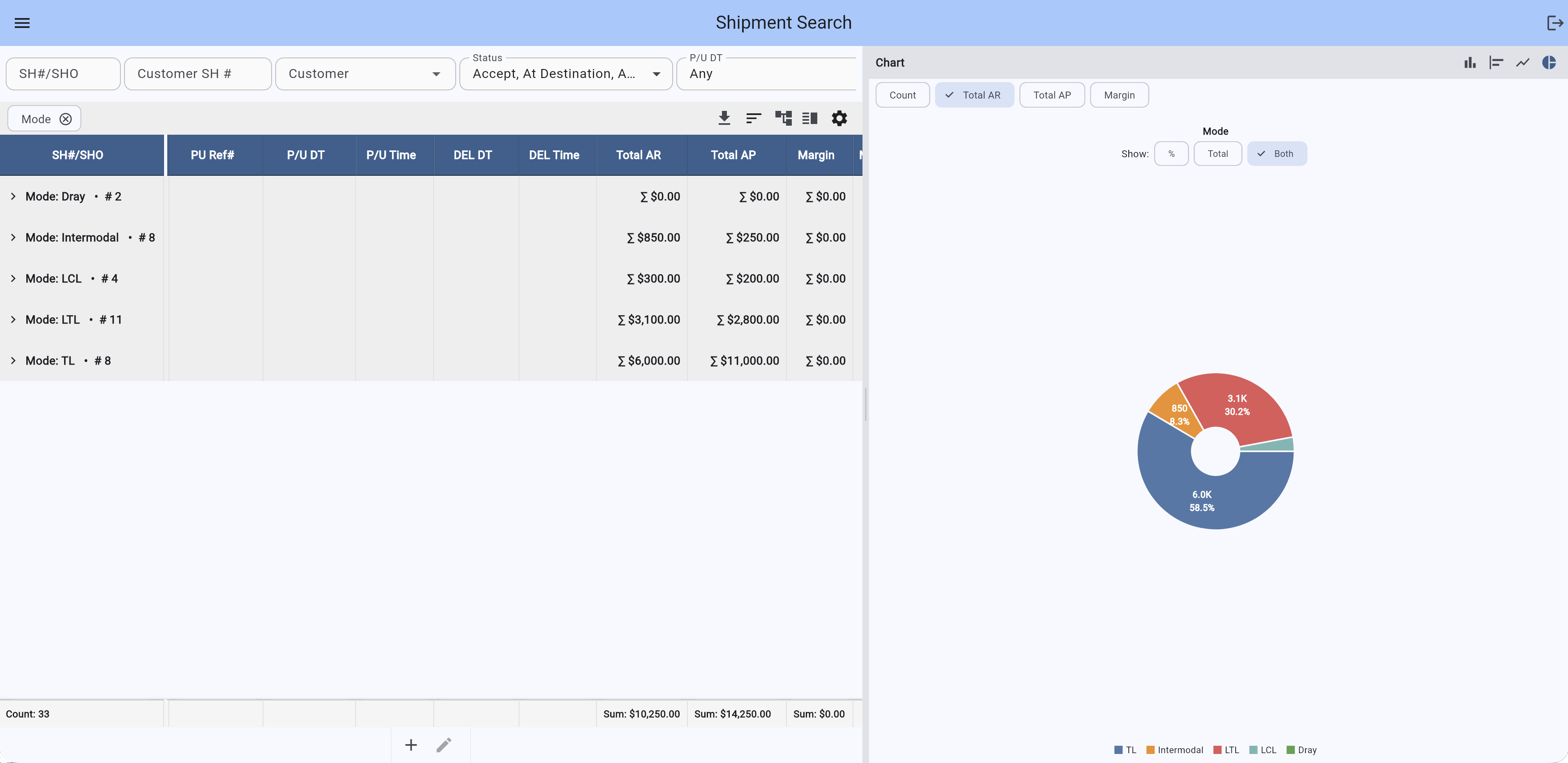
Dispatch, planning and settlement all happen on these screens. They are dense on purpose — the people using them manage dozens of loads at once and should not have to click through a wizard to do it. The screens can be shaped around the way your desk actually works — the fields, views, permissions and detail your people need — without turning your operation into a separate product branch.

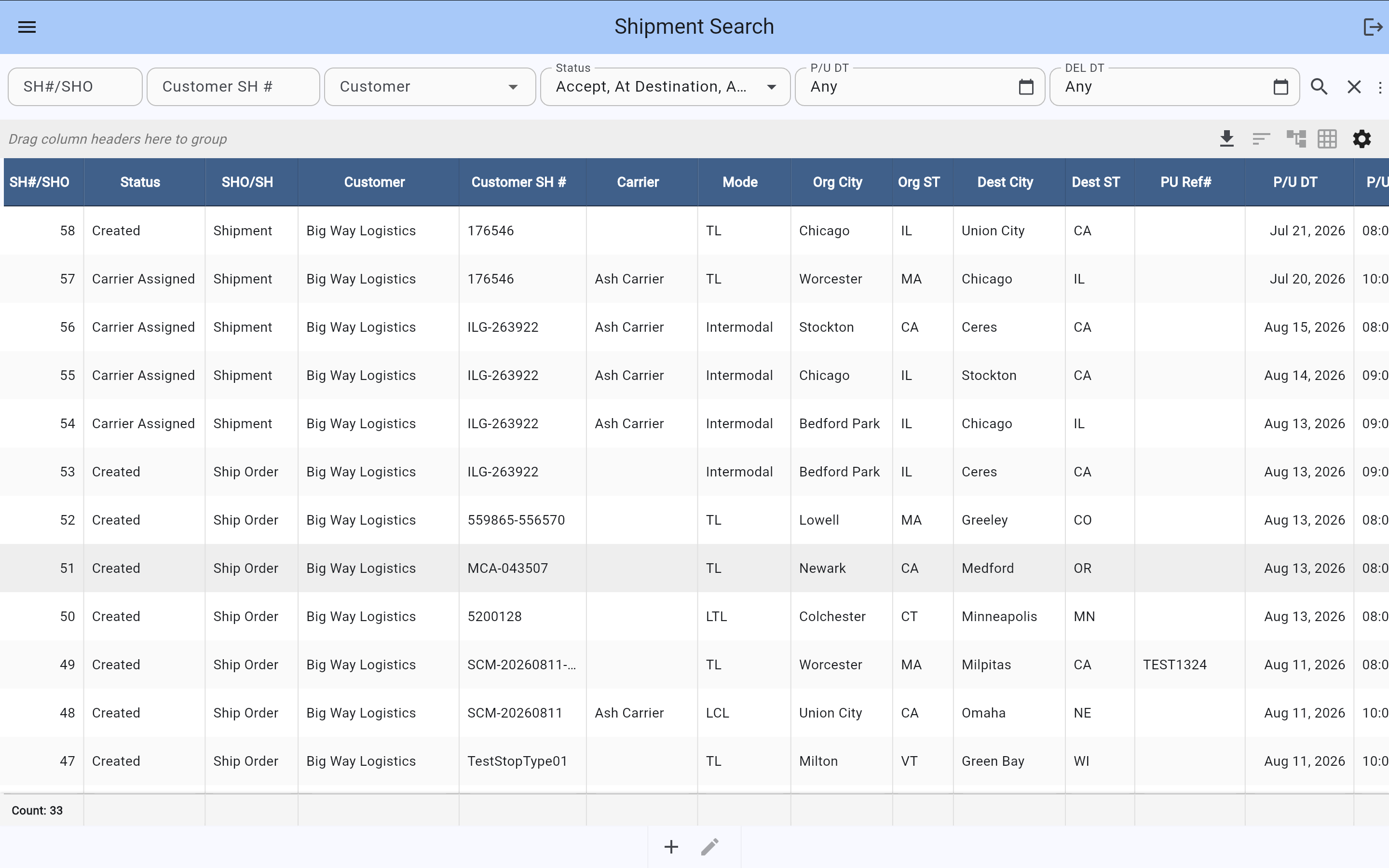
Shipment search grid showing filter conditions, multi-column sorting and footer totals
Screen 01The search gridSaved filter conditions across the top, multi-column sorting (status first, then pickup date), status shown as data rather than decoration, and running totals in the footer. Column set, formats, alignment and role visibility can be shaped around the way each team works.
Shipment search grid grouped by mode with running totals, alongside a donut chart of revenue by mode
Screen 02Grouping and charts on the same dataShipments grouped by mode, with revenue, cost and margin totalled per group and a running count. The chart draws from whatever grouping is on screen and switches between count, revenue, cost and margin as you click. Nobody configured this view.
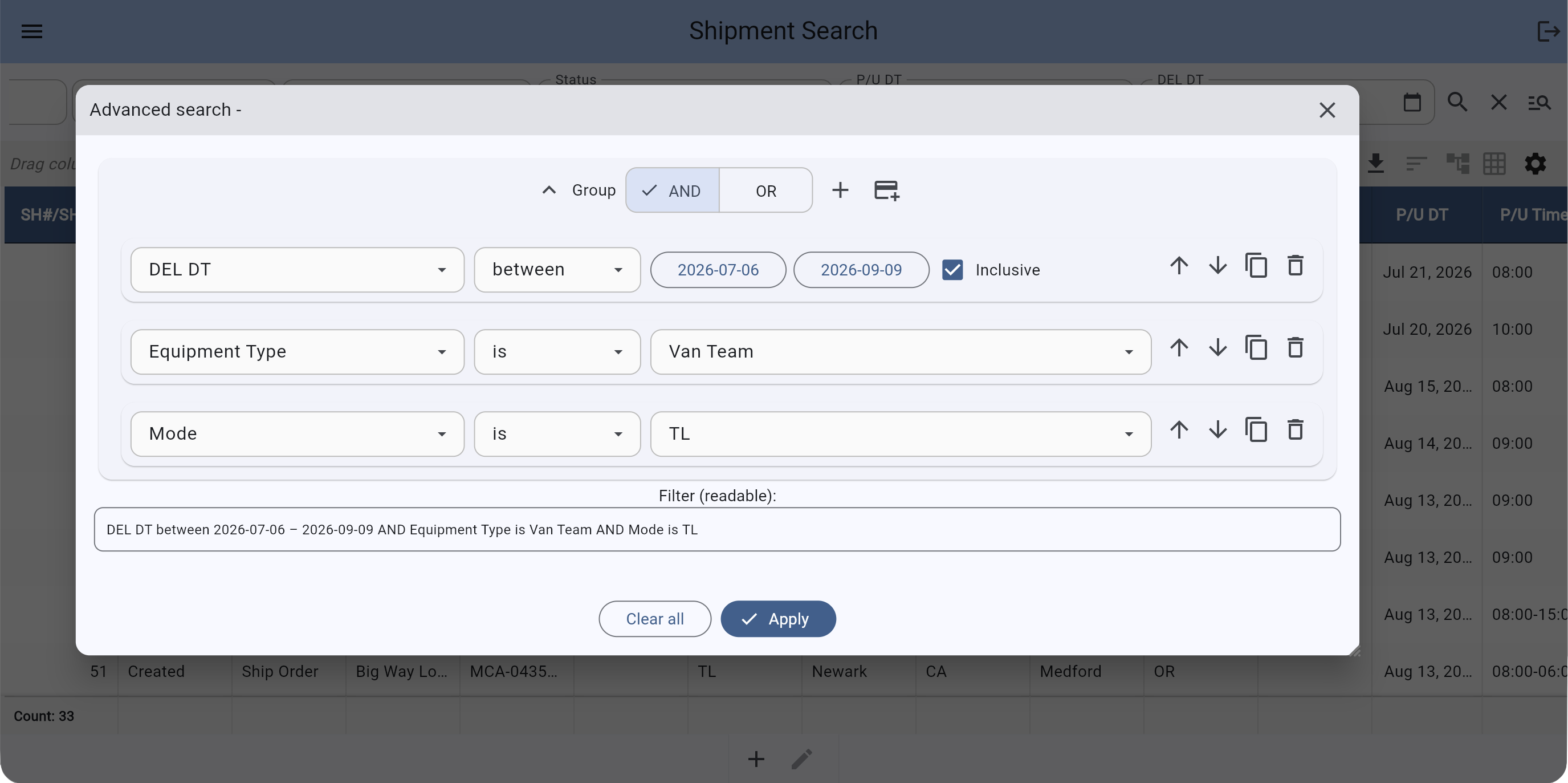
Advanced search builder with nested AND and OR condition groups
Screen 03Advanced search with AND / ORConditions can be built across the fields available to the operation, including nested groups where any one of several conditions may be true. Users save their own views and come back to them.
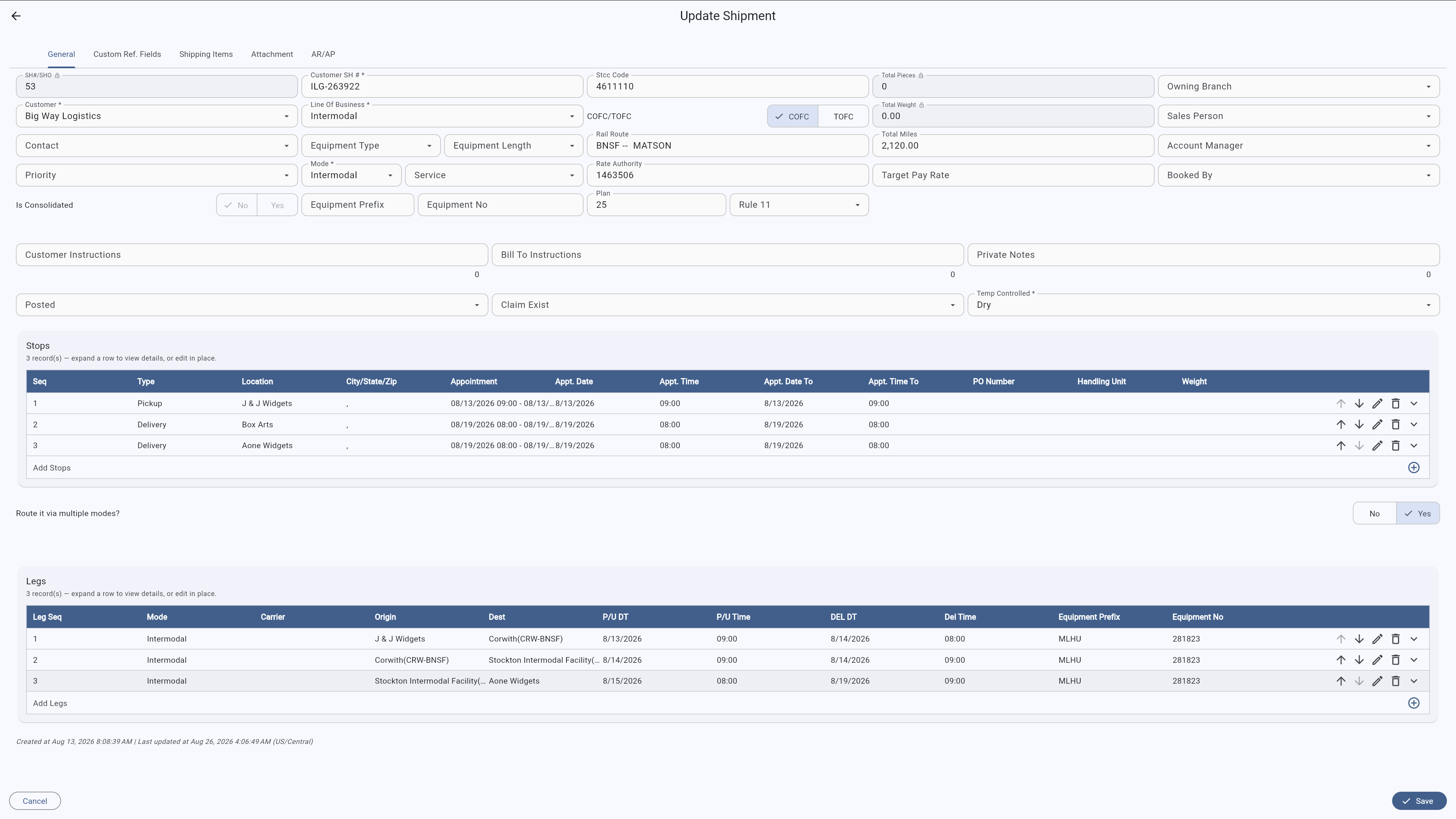
Shipment record with five tabs, dozens of fields, and editable stops and legs grids
Screen 04A genuinely complex screenFive tabs, dozens of fields, an editable stops table and a legs table for multi-modal routing, with add, reorder and delete on every row. The layout can be shaped to the operation without rebuilding the product.
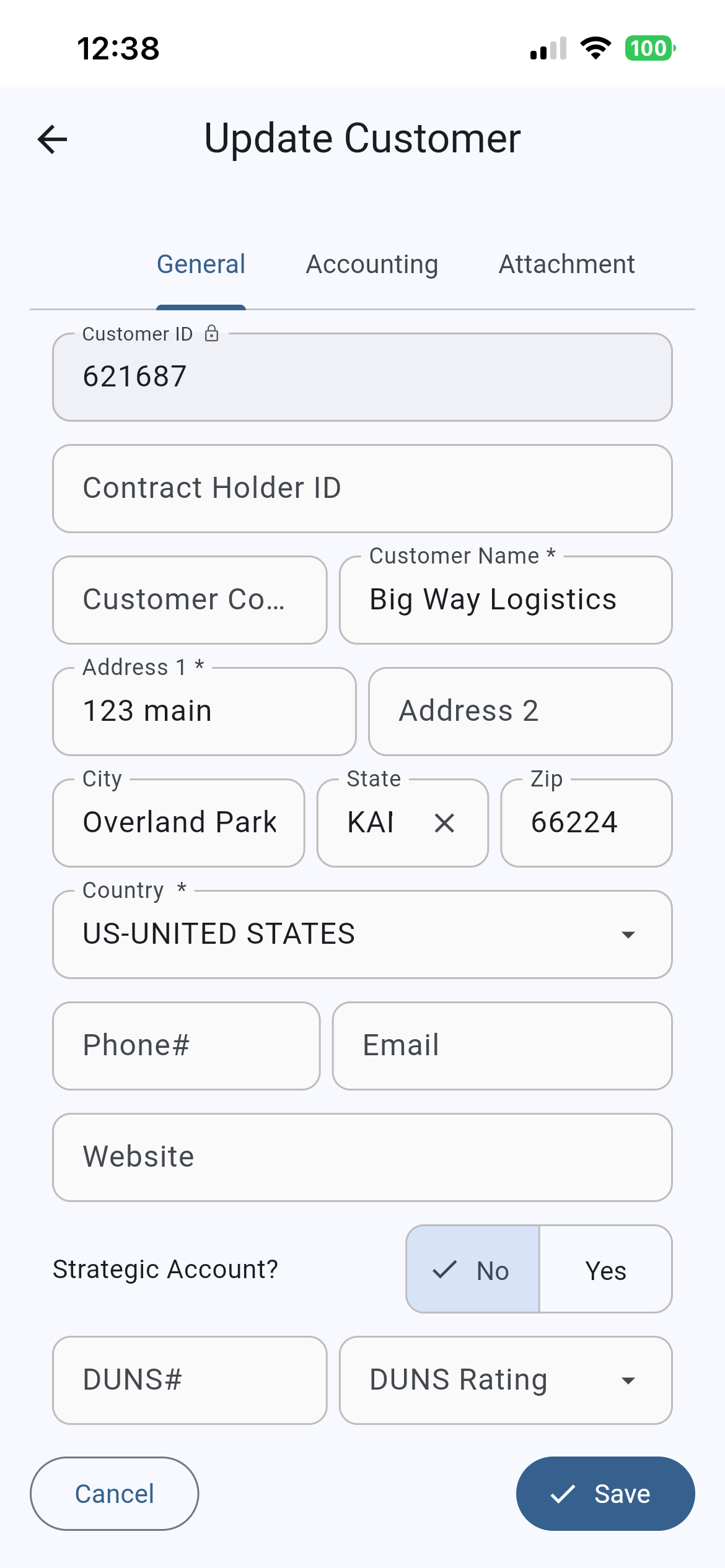
Mobile tracking app showing a driver's assigned loads and status actions
Screen 05

SmartSCM on Mobile

Full functionality, any device. View and update customer profiles, check shipment status, and manage your account from your phone. Available on iPhone and Android.

Representative screens shown with sample data.

Integrations

Mapped to your partners, not the other way round.

Because interfaces are defined as mappings rather than hand-coded, adding a trading partner is configuration work measured in days.

  • EDI, XML, API, FTP, SFTP and AS2 with customers, carriers and vendors
  • DAT and Truckstop load boards for locating capacity
  • SMC3 for base tariff rates and carrier service
  • PC*Miler and Google mileage engines — others on request
  • SaferWatch for carrier qualification and safety standing
  • Most accounting systems for customer, carrier, A/R and A/P exchange
  • Preloaded master data: zip codes, rail ramps, ports and airports
  • Every interface runs over authenticated, encrypted channels — see the security overview

Bring the shipment that breaks your current system.

A multi-stop consolidation, an unusual settlement rule, a customer with a strange EDI requirement. That's a real evaluation.